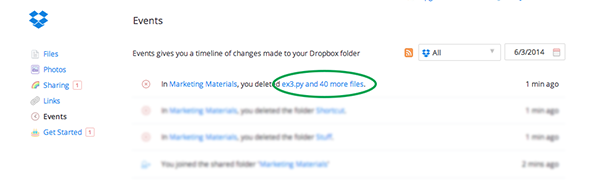
Need to restore a bunch of files that were deleted? For files deleted within the last 30 days (or longer with the Extended Version History feature), it's possible to undo many deletion events either directly from the Events page or by sending us a link to a particular event (if you're not able to undo it from the Events page).
Note: If you're looking to undo an event in which just one file was deleted you can easily recover a single file yourself.
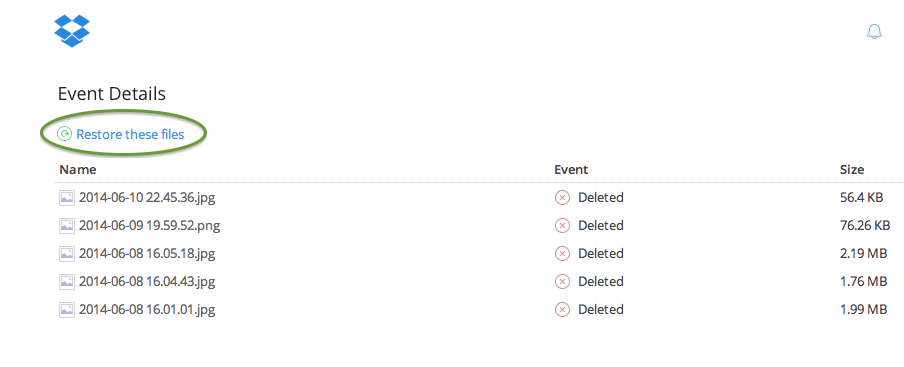
Note: If the option to restore these files doesn't appear or you run into an error, please send in a link to the deletion event using the steps below.
Click on the link in the event you want to undo
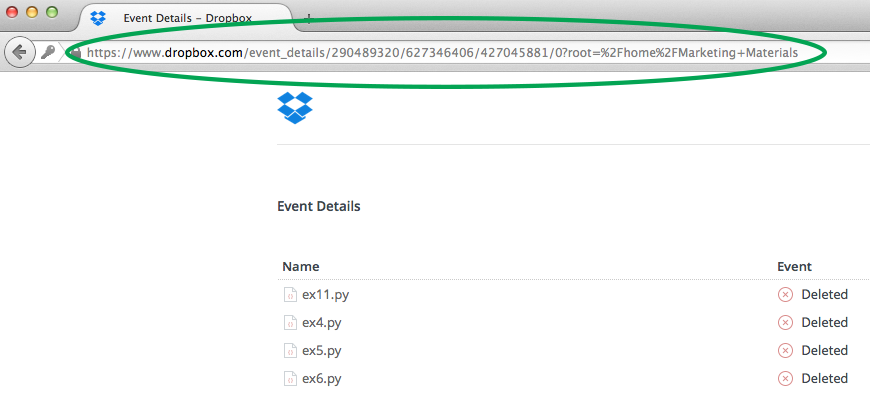 Copy the link that appears in your browser's address field
Use the same method to get other event links as needed.
If you are in contact with our support team regarding an account rollback, you will be asked to provide an event link. Please note that the link you provide will be to an individual event—our support agents will rollback your account to its exact state prior to this event. This means that any changes to files or folders you made after that event will be overwritten. It may be useful to make a separate copy (outside of your Dropbox) of any files you have recently edited so that you don't lose any important changes.
If you would still like to proceed with the account rollback, please find the information you need in the Get a link to the event you'd like to undo instructions and provide it to our support agents.

