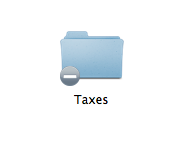
Selective Sync is a feature that allows you to select only the folders you want to sync to your computer. However, a Selective Sync conflict can occur when you choose not to sync a folder to your computer in your Selective Sync preferences and then create a folder of the same name in the same location. For example, if you create a folder called "Taxes," then uncheck "Taxes" in your Selective Sync preferences, this will stop "Taxes" from syncing to the Dropbox folder on your computer. If you then create a new folder called "Taxes" in the same location in Dropbox, it will appear with a gray minus sign, and Dropbox will not sync that folder.
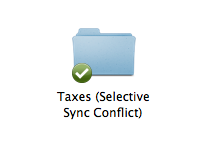
If you re-check the original "Taxes" (in your Selective Sync preferences) to resume syncing to your computer along with the new "Taxes," the name of the "Taxes" folder with the minus sign will be appended with "(Selective Sync Conflict)." Both folders will sync to your account online.